0 ratings

Item #:
23305906
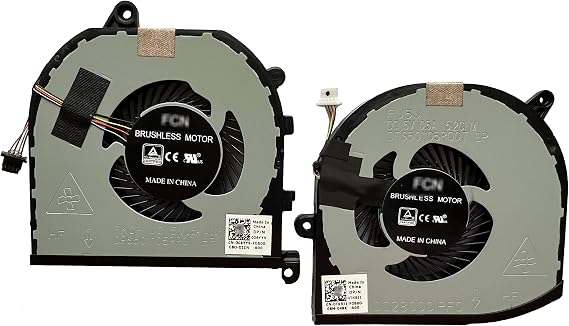
Fan Replacement for Dell XPS 15 9570 CPU Fan & Gpu Fan TK9J1 08YY9 CN-0TK9J1 CN-008YY9
Item #:
23305906
ZMW 887
Price Details
Excluding Shipping & Custom charges ( Shipping and custom charges will be calculated on checkout )
*All items will import from US
0 ratings
Write a review
In stock
 Imported from USA store
QTY:
Order now and get it around Saturday, August 01
Secured transaction
Ubuy works hard to protect your security and privacy. Our advanced payment security system ensures confidentiality by encrypting your information during transmission using AES (Advanced Encryption Standards) and SSL (Secure Socket Layer) protocols. Your payment details are 100% secure as we do not share your payment details with third party sellers.
Our Top Logistics Partners


New for XPS 15-9570 CPU and GPU fan set with good quality and reasonable price.

Fast
Shipping

Free
Return*

Secure Packaging

100% Original Products

PCI DSS Compliance

ISO 27001 Certified


Note: Step Down Voltage Transformer required for using electronics products of US store (110-120). Recommended power converters Buy Now.


What Stands Out
Compatibility
Designed specifically for Dell XPS 15 9570, ensuring a perfect fit and optimal performance without the risk of mismatch, making it a reliable replacement option for users.
Enhanced Cooling
Delivers superior cooling efficiency for both CPU and GPU, preventing overheating during intensive tasks, thus prolonging device lifespan and maintaining peak performance.
Easy Installation
User-friendly design allows for straightforward installation, reducing downtime for users and eliminating the need for professional assistance, making it accessible for all skill levels.
Product Details
- Genuine replacement fan set for Dell XPS 15-9570 laptop
- Set includes left and right side cpu and gpu fans
- Compatible with XPS 15-9570 series laptop
- Package includes CPU fan, GPU fan, and thermal grease
- Each fan has 4 wires to connector
- Good quality fans at a reasonable price
| Package Weight | 1 Pound |
Who Should Buy?

-
Gamers
Ideal for gamers experiencing overheating issues, ensuring stable performance during prolonged gameplay sessions.
-
Frequent Users
Benefits regular users who rely on high performance for tasks such as video editing or graphic design.
-
DIY Repair Enthusiasts
Perfect for those who enjoy repairing their own devices and want to replace malfunctioning fans easily.

-
Casual Users
Less suitable for users with light computing needs, as they may not experience overheating issues.
-
Older Laptop Models
Not recommended for older Dell models, as compatibility may be an issue with different fan specifications.
-
Non-Tech Savvy
Users unfamiliar with laptop repairs may struggle with installation, requiring professional assistance.
Product Description
Fan Replacement for Dell XPS 15 9570 CPU Fan & Gpu Fan TK9J1 08YY9 CN-0TK9J1 CN-008YY9
About This Item
Introducing the HK-PART Fan Replacement for Dell XPS 15-9570 CPU Gpu Cooling Fan Set Are you experiencing overheating issues with your Dell XPS 15-9570? Look no further, because we have the perfect solution for you. The HK-PART Fan Replacement for Dell XPS 15-9570 CPU Gpu Cooling Fan Set is designed to provide efficient cooling for your laptop, ensuring optimal performance and preventing potential damage caused by excess heat. Featuring a high-quality construction, this cooling fan set is a reliable and durable replacement for your faulty or worn-out fans. The set includes both the CPU and GPU cooling fans, ensuring comprehensive cooling coverage for your Dell XPS 15-9570.
Engineered to deliver powerful airflow, these fans effectively dissipate heat generated by your CPU and GPU, keeping them within safe operating temperatures. This not only prolongs the lifespan of your laptop but also prevents any slowdowns or system crashes caused by excessive heat. Installing these replacement fans is a breeze, with a direct fit design that matches the original fan assembly. Simply replace the old fans with the HK-PART Fan Replacement set and say goodbye to overheating problems.
We understand the importance of quality and performance, which is why we offer only genuine HK-PART products. Rest assured knowing that you are getting a reliable and high-performing cooling fan set for your Dell XPS 15-9570. Don't let heat compromise your laptop's performance. Upgrade your cooling system with the HK-PART Fan Replacement for Dell XPS 15-9570 CPU Gpu Cooling Fan Set today and enjoy a cool and efficient computing experience.
Have any Query? Chat with us
Customer Questions & Answers
-
Question:
What are the symptoms indicating I need to replace the fans in my Dell XPS 15 9570?
Answer: Common symptoms include excessive overheating, loud noise from the fan, or system slowdowns due to thermal throttling. If your laptop frequently shuts down unexpectedly or the fans are continuously running at high speeds, it’s likely time for a replacement. Overheating can damage components over time, so addressing fan issues promptly helps maintain optimal performance. -
Question:
How do I know if the fan replacement TK9J1 08YY9 is compatible with my Dell XPS 15 9570?
Answer: To ensure compatibility, check your laptop's model number and specifications against the fan specifications. The TK9J1 08YY9, CN-0TK9J1, and CN-008YY9 identifiers are specific to the XPS 15 9570 model. If your device matches one of these identifiers, you can confidently use this replacement fan to restore efficient cooling to your laptop. -
Question:
Can I replace the Dell XPS 15 9570 CPU and GPU fans myself?
Answer: Yes, replacing the CPU and GPU fans can be a DIY project if you have some technical skills. You’ll need basic tools and a guide or tutorial for step-by-step instructions. Ensure you're grounded to prevent static damage. A successful replacement can enhance your laptop's cooling efficiency, prolonging the lifespan of internal components. -
Question:
What tools do I need to replace the fans in my Dell XPS 15 9570?
Answer: You typically need a Phillips screwdriver, a prying tool, and possibly an anti-static wrist strap. These tools will allow you to safely open the laptop case and disconnect the old fans. Having the right tools makes the replacement process smoother and helps prevent damage to your laptop’s delicate components. -
Question:
How often should I check or replace the fans in my Dell XPS 15 9570?
Answer: It's advisable to check your fans at least once every few months for dust buildup or signs of wear. If you frequently use your laptop for intensive tasks like gaming or video editing, more frequent checks might be necessary. Ensuring your fans are clean and functional is key to keeping your system cool and running effectively. -
Question:
Are there any specific signs that my Dell XPS 15 9570 fans are failing?
Answer: Signs of failing fans include irregular noises such as rattling or grinding, fans that do not spin, or irregular speed fluctuations. Additionally, if your laptop runs hotter than usual or exhibits performance drops, these are indications that the cooling system is compromised, prompting a need for a fan replacement. -
Question:
Is it better to replace both the CPU and GPU fans at the same time?
Answer: Yes, it can be beneficial to replace both fans simultaneously. This approach ensures even cooling efficiency, as both components generate significant heat. By doing so, you promote balanced thermal management and potentially avoid future inconsistencies in performance, especially during demanding tasks. -
Question:
What kind of maintenance should I perform after installing new fans?
Answer: After installation, periodically clean the fan areas to prevent dust accumulation. You should also monitor temperatures to ensure the new fans are functioning effectively. Routine checks can help you detect performance issues early on, ensuring that your laptop continues to run at optimal temperatures. -
Question:
Where can I buy Fan Replacement for Dell XPS 15 9570 CPU Fan & GPU Fan TK9J1 08YY9?
Answer: You can conveniently purchase the Fan Replacement for Dell XPS 15 9570 from Ubuy. They offer a variety of replacement parts that are compatible with your device. Ubuy provides a straightforward shopping experience, making it easier for you to find the exact components needed for your laptop repair.
HK-PART CPU Cooling Fans Editorial Review
No editorial reviews found
Customer Reviews & Ratings
1 customers ratings
-
5 Star
100%
-
4 Star
0%
-
3 Star
0%
-
2 Star
0%
-
1 Star
0%
Review this product
Share your thoughts with other customers
Platform Trust & Buyer Confidence

MT
Mohd
Verified buyer
“The product received very good packaging & safe…Thank You”
16 June 2026 · via Trustpilot
SJ
Shawati
Verified buyer
“Accurate delivery timing given”
16 June 2026 · via Trustpilot
YB
Youcef
Verified buyer
“Not madly expensive like I thought, and much quicker than promised.”
15 June 2026 · via Trustpilot
LM
Leila
Verified buyer
“Never dealt with Ubuy before, but everything worked out great. Seamless cross border purchasing and shipping. Thanks!”
6/7/2026 · via Trustpilot
KA
Kwame
Verified buyer
“The process was smooth, with clear communication and timelines. This was my 1st purchase and I am really impressed. I will definitely be coming back.”
12 June 2026 · via Trustpilot
Secure Checkout
Global Delivery
Easy Returns
Genuine Products
Product Price History
Important information
- Limitations : For products shipped internationally, please note that any manufacturer warranty may not be valid; manufacturer service options may not be available; product manuals, instructions, and safety warnings may not be in destination country languages; the products (and accompanying materials) may not be designed in accordance with destination country standards, specifications, and labeling requirements; and the products may not conform to destination country voltage and other electrical standards (requiring use of an adapter or converter if appropriate). The recipient is responsible for assuring that the product can be lawfully imported to the destination country. When ordering from Ubuy or its affiliates, the recipient is the importer of record and must comply with all laws and regulations of the destination country.
- Not all the products listed on Ubuy are for sale, as Ubuy is a global search engine. Products are subject to export/trade regulations.
ZMW 887
Order now and get it around Saturday, August 01
This item is not restrict in my country.(Please click on above link if this item is not restrict in your country, So our team will review and allow.)
QTY:
Secured transaction
PCI DSS compliant and ISO 27001:2022 certified, with encrypted payments and full buyer protection on every order.
Our Top Logistics Partners
Fastest cross-border delivery
Features & Benefits
- Compatible with XPS 15-9570 series laptop only
- Package includes both CPU and GPU fan set with thermal paste (free)
- Please compare your current fan with the listing photo before ordering
- Using laptop model and fan part number may not be sufficient
- Genuine replacement fan set
- 4 wires per fan connector
Ubuy Assurance
Experience worry-free shopping with 100% original products, PCI DSS-compliant payment security, ISO 27001-certified data protection, the fastest cross-border delivery, free returns *, and secure packaging on every order.