- Home Page /
- Video Games /
- PC /
- Accessories /
- Controllers /
- Joysticks /
- PXN Flight simulator controls 2113 pc flight ...
0 ratings





Item #:
27073353
PXN Flight simulator controls 2113 pc flight joystick controls with Vibration Function and Throttle Controls Wired Flight Stick for PC Windows
84% of respondents would recommend this to a friend
Item #:
27073353
ZMW 1650
Price Details
Excluding Shipping & Custom charges ( Shipping and custom charges will be calculated on checkout )
*All items will import from US
0 ratings
Write a review
In stock
 Imported from USA store
QTY:
Order now and get it around Tuesday, July 07
Secured transaction
Ubuy works hard to protect your security and privacy. Our advanced payment security system ensures confidentiality by encrypting your information during transmission using AES (Advanced Encryption Standards) and SSL (Secure Socket Layer) protocols. Your payment details are 100% secure as we do not share your payment details with third party sellers.
Our Top Logistics Partners


PXN-2113 joystick provides a Vibration Function and Throttle Controls, giving gamers a multi-functional design that enables them to enjoy the happiness of the game.

Fast
Shipping

Free
Return*

Secure Packaging

100% Original Products

PCI DSS Compliance

ISO 27001 Certified


Note: Step Down Voltage Transformer required for using electronics products of US store (110-120). Recommended power converters Buy Now.


What Stands Out
Vibration Function
Experience realistic feedback with the integrated vibration function, enhancing immersion during flight simulations and providing a more authentic piloting experience.
Throttle Controls
Precise throttle controls allow for better speed management and smoother operations, making it easier to navigate complex flight scenarios efficiently.
Wide Compatibility
Designed for PC and compatible with various Windows versions, ensuring broad usability with most flight simulation software, ideal for gamers and aviation enthusiasts.
Product Details
- 1.【Vibration Function】According to the game scene,The full rated vibration engine can produce different vibration effects, The vibration switch is located at the bottom of the joystick, please switch to "ON". If the vibration intensity is less than 20%,Please set the vibration strength in the driver to 50% or higher) Compatible with almost flight games:World of Tanks,World of Warplanes,War Thunder,Assault Horizon,Microsoft Flight Simulator,X Plane 10,etc.(Note:Minecraft,Asphalt 8 not supported).
- 2.【compatibility】:PXN 2113 Flight Simulation Rocker Compatible with PC / Desktop Computer / Notebook, compatible with Windows 7/8/10 system, suitable for Suitable for "Microsoft Flight Simulator 2020", "X-Plane 11," World of Warplanes, "Ace Air Force", "War Thunder", "Ace Combat", "Eagle Strike Sky 2", And "Battlefield 1942", And All PC Flight Simulation Games, [NOTE]: (Do Not Support Mac / Apple Computers / Apple Device / PS3 / PS4 / Xbox One / PS5 / NINTENDO SWITCH.
- 3. 【Connection Question】Please open the computer first, then connect the PXN-2113 joystick, plug and play, no need to install the driver. If the device does not work, please download the PXN2113 driver, please visit the E-PXN official website: Home - Support - Tool -PXN JOYSITCK SOFWARE, download and install driver, after connecting, please enter the game to make the game interface settings and mode selection if you There is any "connection problem", please give c-zone mail, thank you
- 4.【Multifunctional Design】 You can quickly control, direct bitter direction, to achieve the left, right upper four directions and 45 degrees, convenient for the conversion angle of the game, the battle is a look, four axes (X / Y / RZ axis) + accelerate Valve + 12 programmable buttons + eight-way cover, integrated vibration motor, motivation experience during the game, these functional configuration allows you to enjoy the happiness of the game.
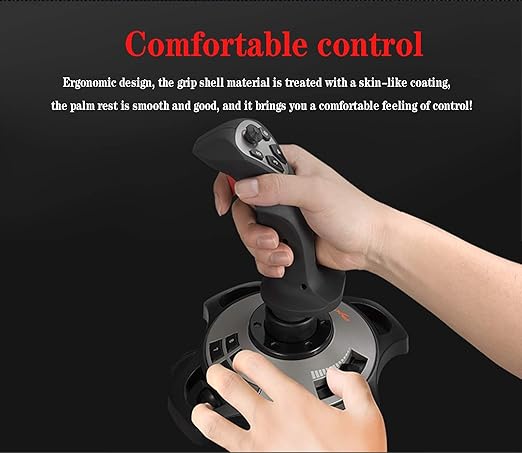
- 5. 【Enjoy it】 PXN-2113 flight controller manipulate swing chasing military machine, successfully blocking, aiming, pulling trigger, shooting is as simple, download PXN-2113 driver, controller software supports keyboard button setting, dead zone Adjustment, button mapping, axial map, etc., etc., according to the game needs to create your personal customization, the flight controller design is ergonomic, and it will not feel tired for a long time.
| Compatible Devices | PC |
| Controller Type | Joystick |
| Connectivity Technology | USB |
| Additional Features | Ergonomic |
| Button Quantity | 12 |
| Hardware Platform | pc |
| Power Source | Corded Electric |
| Compatible Video Game Console Models | Microsoft Xbox One, Microsoft Xbox One S, Microsoft Xbox One X, Nintendo Switch, Sony PlayStation 3, Sony PlayStation 4, Sony PlayStation 5 |
| Item Weight | 0.73 Kilograms |
| Package Quantity | 1 |
| Item Dimensions D x W x H | 7.28"D x 7.28"W x 8.86"H (18.5 x 18.5 x 22.5 cm) |
| Brand Name | PXN |
| Model Name | PXN Flight simulator controls 2113 |
| Manufacturer | PXN |
| Global Trade Identification Number | 00611864775166 |
| UPC | 611864775166 |
| Manufacturer Part Number | PXN-2113 |
| Color | Black |
Who Should Buy?

-
Flight Simulator Enthusiasts
Ideal for gamers who enjoy immersive flight simulations, enhancing their experience with realistic controls and vibration feedback.
-
Budget-Conscious Gamers
A great option for those seeking a cost-effective flight stick without compromising on essential features and performance.
-
Casual Users
Perfect for occasional users who want an easy-to-use joystick for casual gaming or introductory flight experiences.

-
Professional Pilots
May lack advanced features required by professional pilots for serious training or simulation work in realistic environments.
-
High-End Gamers
Pros may find this joystick limiting compared to more sophisticated and customizable flight control systems available.
-
Console Gamers
Not suitable for users primarily gaming on consoles, as this joystick is designed exclusively for PC use.
Product Description
Have any Query? Chat with us
Customer Questions & Answers
-
Question:
What makes the PXN 2113 flight joystick ideal for flight simulation?
Answer: The PXN 2113 flight joystick is designed specifically for flight simulation enthusiasts, featuring a realistic design that replicates the feel of operating an aircraft. Its vibration function enhances immersion by providing feedback during flight, while the throttle controls allow for precise speed adjustments, crucial in simulations. Gamers can navigate complex flight scenarios, making it ideal for both novices and experienced users looking for a true-to-life experience. -
Question:
Is the PXN Flight Simulator Controls 2113 compatible with all PC operating systems?
Answer: Yes, the PXN Flight Simulator Controls 2113 is compatible with Windows operating systems, ensuring that users can easily connect and start flying without compatibility issues. This plug-and-play flight stick setup is particularly beneficial for gamers who want to jump right into their simulations without needing extensive configuration. Users can enjoy a variety of flight simulation software, enhancing their overall gaming experience. -
Question:
How does the vibration function work in the PXN 2113 joystick?
Answer: The vibration function in the PXN 2113 joystick simulates real-world flight experiences by providing tactile feedback during critical moments, such as turbulence or impact. This feature engages users on a sensory level, allowing them to feel the dynamics of flight and increases immersion in simulations. It’s especially beneficial during aerial maneuvers or when encountering challenging weather conditions within the game. -
Question:
What kind of throttle controls does the PXN 2113 offer?
Answer: The PXN 2113 is equipped with an intuitive throttle control that allows users to finely adjust their engine power levels during flight. This feature is essential for managing speed and altitude, making it easier to handle various flight scenarios. Enthusiasts appreciate the smooth operation of the throttle, which contributes to a more authentic flying experience, ensuring precise control during takeoff, cruising, and landing. -
Question:
Can I use the PXN 2113 joystick for non-flight simulation games?
Answer: While the PXN 2113 joystick is tailored for flight simulations, it can also be utilized for various non-flight games that support joystick input. This versatility allows users to experience different game genres with enhanced control and responsiveness. Gamers can explore racing games or action titles that allow analog input, giving them a broader gaming experience beyond just simulations. -
Question:
Is the PXN 2113 easy to set up for beginners?
Answer: Yes, the PXN 2113 joystick is designed for simplicity, making it user-friendly for beginners. The plug-and-play functionality allows it to be connected to a PC without complex installation processes. Additionally, it is typically compatible with most flight simulation software, ensuring that newcomers can focus on learning to fly rather than troubleshooting equipment setup. This ease of use makes it a popular choice for those new to flight simulation. -
Question:
What types of users benefit most from the PXN Flight Simulator Controls 2113?
Answer: The PXN Flight Simulator Controls 2113 benefits a wide range of users, from casual gamers looking for a realistic flying experience to serious aviation enthusiasts seeking a closer simulation to real flying. Flight training schools may also find value in this joystick for its realistic controls. Additionally, it's perfect for anyone interested in virtual reality flight simulations, as it enhances immersion and control. -
Question:
Do I need additional software to use the PXN 2113 joystick?
Answer: No additional software is typically required to use the PXN 2113 joystick; it works seamlessly with many popular flight simulation programs out of the box. However, certain advanced features might be enhanced by specific software packages. Users can enjoy a straightforward gaming experience without the hassle of extensive setup, focusing instead on perfecting their flying skills and enjoying their favorite simulations. -
Question:
How durable is the PXN 2113 joystick for long-term use?
Answer: The PXN 2113 joystick is built with durability in mind, featuring high-quality materials that can withstand the rigors of frequent gaming. The responsive controls ensure consistent performance over time, allowing enthusiasts to fully engage in their flight simulations. This longevity is particularly beneficial for dedicated users who spend hours practicing and honing their skills, ensuring they have a reliable tool for their aviation adventures. -
Question:
Where can I buy the PXN Flight Simulator Controls 2113 in Zambia?
Answer: You can buy the PXN Flight Simulator Controls 2113 at Ubuy in Zambia. Ubuy offers a convenient platform for acquiring this high-quality flight joystick, ensuring that customers can easily purchase it with just a few clicks. With Ubuy's wide range of products and user-friendly experience, getting your hands on the PXN 2113 for your flight simulation needs is quick and hassle-free.
PXN Joysticks Editorial Review
No editorial reviews found
Customer Reviews & Ratings
251 customers ratings
-
5 Star
55%
-
4 Star
14%
-
3 Star
7%
-
2 Star
8%
-
1 Star
16%
Review this product
Share your thoughts with other customers
Product Price History
Important information
- Limitations : For products shipped internationally, please note that any manufacturer warranty may not be valid; manufacturer service options may not be available; product manuals, instructions, and safety warnings may not be in destination country languages; the products (and accompanying materials) may not be designed in accordance with destination country standards, specifications, and labeling requirements; and the products may not conform to destination country voltage and other electrical standards (requiring use of an adapter or converter if appropriate). The recipient is responsible for assuring that the product can be lawfully imported to the destination country. When ordering from Ubuy or its affiliates, the recipient is the importer of record and must comply with all laws and regulations of the destination country.
- Not all the products listed on Ubuy are for sale, as Ubuy is a global search engine. Products are subject to export/trade regulations.
ZMW 1650
Order now and get it around Tuesday, July 07
This item is not restrict in my country.(Please click on above link if this item is not restrict in your country, So our team will review and allow.)
QTY:
Secured transaction
Ubuy works hard to protect your security and privacy. Our advanced payment security system ensures confidentiality by encrypting your information during transmission using AES (Advanced Encryption Standards) and SSL (Secure Socket Layer) protocols. Your payment details are 100% secure as we do not share your payment details with third party sellers.
Our Top Logistics Partners
Fastest cross-border delivery
Features & Benefits
- Vibration Function
- Compatibility with almost all flight games
- Easy Connection
- Multifunctional Design
- Enjoyable gaming experience
- Ergonomic design