- Home Page /
- Electronics /
- Computer Accessories /
- Computer Accessories & Peripherals /
- Keyboards, Mice & Accessories /
- Computer Keyboards /
- Microsoft Surface Pro Signature Keyboard with...
0 ratings


Item #:
59851009
Microsoft Surface Pro Signature Keyboard with Slim Pen 2 Bundle, Forest Colour Keyboard
90% of respondents would recommend this to a friend
Item #:
59851009
ZMW 6317
Price Details
Excluding Shipping & Custom charges ( Shipping and custom charges will be calculated on checkout )
*All items will import from US
In stock
 Imported from USA store
QTY:
Order now and get it around Thursday, October 08
Secured transaction
Ubuy works hard to protect your security and privacy. Our advanced payment security system ensures confidentiality by encrypting your information during transmission using AES (Advanced Encryption Standards) and SSL (Secure Socket Layer) protocols. Your payment details are 100% secure as we do not share your payment details with third party sellers.
Our Top Logistics Partners


An exceptional typing experience. Sleek and compact, it performs like a traditional laptop keyboard, complete with a large touchpad for precise control and navigation.

Fast
Shipping

Free
Return*

Secure Packaging

100% Original Products

PCI DSS Compliance

ISO 27001 Certified




Note: Step Down Voltage Transformer required for using electronics products of US store (110-120). Recommended power converters Buy Now.


What Stands Out
Premium Touch
The keyboard features a luxurious fabric finish that offers a soft, premium touch experience, enhancing comfort during extended typing sessions.
Integrated Slim Pen 2
Includes the Slim Pen 2, seamlessly integrated for precise writing and drawing, allowing users to maximize creativity and productivity on their Surface Pro.
Forest Color Design
The unique forest color adds a stylish aesthetic to your device, making it stand out while appealing to users seeking a sophisticated, modern look.
Product Details
| Compatible Devices | Tablet |
| Connectivity Technology | Bluetooth |
| Additional Features | Backlit, Trackpad |
| Keyboard Backlighting Color Support | Single Color |
| Language | English |
| Power Source | Battery Powered |
| Switch Type | Mechanical |
| Keyboard Layout | QWERTY |
| Hand Orientation | Ambidextrous |
| Button Quantity | 78 |
| Water Resistance Level | Not Water Resistant |
| Minimum Required Operating System Version | Windows 10 |
| Compatible Operating System Family | Windows |
| Compatible Tablet Computer Models | Microsoft Surface Pro 8, Microsoft Surface Pro 9, Microsoft Surface Pro X |
| Number of Keys | 79 |
| Number of Sections | 1 |
| Color | Forest |
| Style Name | Keyboard & Pen |
| Theme | Electronics, Nature-inspired colors |
| Brand | Microsoft |
| Keyboard Description | Standalone |
| Antenna Location | Everyday Use |
| Built-In Media | Surface Pro Keyboard, Surface Slim Pen 2 |
| Model Number | 8X6-00121 |
| Model Name | 8X6-00121 |
| Unit Count | 1 Count |
| Manufacturer | Microsoft |
| Number of Packs | 1 |
| UPC | 196388072576 |
| Number of Items | 1 |
| Generation | 9 |
| Mfr Part Number | 8X6-00121 |
| Item Dimensions L x W x H | 12.5"L x 10"W x 0.75"H (31.8 x 25.4 x 1.9 cm) |
| Enclosure Material | Alcantara |
| Recommended Uses For Product | Everyday Use |
| Special Feature | Backlit, Trackpad |
| Keyboard backlighting color support | Single Color |
| Style | Keyboard & Pen |
| Product Dimensions (L x W x H) | 12.5"L x 10"W x 0.75"H (31.8 x 25.4 x 1.9 cm) |
| Package Weight | 10.12 Pound |
What's in the box
Surface Pro Keyboard
Surface Slim Pen 2
Who Should Buy?

-
Students and Educators
Ideal for those needing a portable and versatile keyboard for note-taking and creative projects in academic settings.
-
Creative Professionals
Great for artists and designers who require precision input with the Slim Pen 2 for sketches and digital work.
-
Business Users
Perfect for professionals who frequently travel and need a lightweight, functional keyboard for presentations and document editing.

-
Gaming Enthusiasts
Not suitable for gamers seeking high-performance keyboards with customizable features and rapid response times for gaming.
Product Description
Have any Query? Chat with us
Customer Questions & Answers
-
Question:
What is included in the Microsoft Surface Pro Signature Keyboard with Slim Pen 2 Bundle?
Answer: The bundle includes the Microsoft Surface Pro Signature Keyboard and the Slim Pen 2. The keyboard features a premium, soft-touch material and a large glass trackpad, enhancing your overall typing experience. The Slim Pen 2 offers a natural writing feel, with exceptional precision for doodling, note-taking, or creating digital art. This complete package is perfect for professionals and students alike who seek a versatile and seamless computing setup. -
Question:
Is the Microsoft Surface Pro Signature Keyboard with Slim Pen 2 Bundle compatible with all Surface devices?
Answer: This bundle is specifically designed to be compatible with the Surface Pro series, including the latest Surface Pro models. It connects easily to your device via the Surface Connect port, ensuring a reliable connection. To maximize performance and features, always ensure your Surface device is running the latest software. This compatibility allows users to incorporate an enriching device interaction experience, whether for work or entertainment. -
Question:
What are the standout features of the Sapphire Colour Keyboard?
Answer: The Sapphire Colour Keyboard stands out with its luxurious aesthetic and innovative design. Made from a high-quality, soft-touch material, it provides an elegant look while being practical for everyday use. Its backlit keys improve visibility in dim settings, while the large, precision trackpad offers enhanced navigation control. This delightful blend of style and functionality makes it suitable for professionals who want to make a statement while staying productive. -
Question:
Can I use the Slim Pen 2 separately from the keyboard?
Answer: Absolutely! The Slim Pen 2 can be used independently of the keyboard. It connects via Bluetooth and can be utilized with compatible Surface devices for digital sketching, note-taking, or navigating the interface. Its lightweight and ergonomic design make it easy to carry, making it ideal for artists, students, or anyone who prefers handwritten notes. The dual use allows for maximum flexibility, depending on your work or creative needs. -
Question:
How does the backlit feature work on the Microsoft Surface Pro Signature Keyboard?
Answer: The backlit feature on the Microsoft Surface Pro Signature Keyboard can be automatically activated based on light conditions or manually controlled through keyboard shortcuts. This illumination helps in low-light environments, ensuring you can work comfortably without straining your eyes. It’s particularly useful for students and professionals who often find themselves working in dimly lit settings such as coffee shops or during late-night sessions. The backlight can elevate your typing experience, offering both functionality and style. -
Question:
What is the battery life of the Slim Pen 2?
Answer: The Slim Pen 2 boasts an impressive battery life, with the capability to last up to 15 hours on a single charge. It features a convenient rechargeable design that allows you to power it up quickly, so you can spend more time creating and less time worrying about battery levels. This is particularly beneficial for users engaged in long meetings, lectures, or creative sessions, ensuring that your productivity remains uninterrupted throughout the day. -
Question:
Is the Surface Pro Signature Keyboard spill-resistant?
Answer: Yes, the Surface Pro Signature Keyboard is designed to be spill-resistant, which means it can withstand minor spills without immediate risk of damage. However, it’s important to clean up spills quickly to prevent any potential issues. This feature is particularly advantageous for students or professionals who often work in environments where accidental spills can occur. Its durability ensures that you can maintain a functional workspace with peace of mind. -
Question:
Can I adjust the keyboard’s typing angle?
Answer: Yes, the Microsoft Surface Pro Signature Keyboard allows for flexible typing angles when combined with the Surface Pro kickstand. Users can position their device at various angles for optimal visibility and comfort, enhancing your overall typing experience. This adjustability is especially helpful for users who might be drawing or taking notes on the device while keeping it at an ergonomic position for the wrists, resulting in greater comfort during extended use. -
Question:
How do the texture and materials enhance the user experience?
Answer: The premium materials used in the Surface Pro Signature Keyboard, including the Alcantara fabric, offer a soft, tactile surface that feels great to the touch. This enhances the typing experience by providing a comfortable grip and reducing finger fatigue. The Keyboard’s sturdy build quality ensures it can withstand daily usage. Many users appreciate the aesthetics and feel of high-quality materials in their devices, making work sessions more enjoyable and visually appealing. -
Question:
Where can I buy the Microsoft Surface Pro Signature Keyboard with Slim Pen 2 Bundle?
Answer: You can purchase the Microsoft Surface Pro Signature Keyboard with Slim Pen 2 Bundle at Ubuy in Zambia. Ubuy provides a reliable platform for you to find this bundle conveniently, ensuring an efficient shopping experience. As a well-regarded Zambia e-commerce site, Ubuy offers a variety of tech products, making it easier for you to get your hands on this sophisticated accessory for your Surface device.
Microsoft Keyboards 8X6-00121 Editorial Review


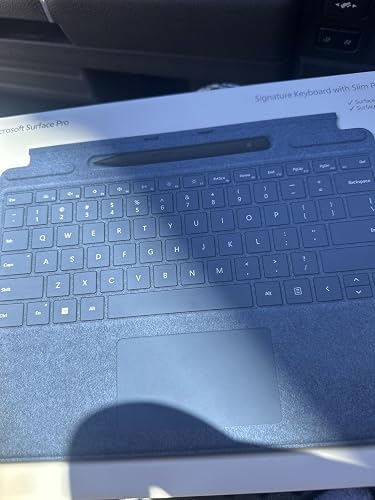


The Microsoft Surface Pro Signature Keyboard with Slim Pen 2 Bundle in Sapphire colour is an excellent addition for Surface Pro users who are looking for a high-end keyboard and a comfortable pen for taking notes or drawing. The keyboard is thin, responsive, and comfortable to type on, while the pen sits neatly in a recess at the top of the keyboard, eliminating the risk of losing it. The keyboard's alcantara material gives it a high-end feel, and the colour adds to the aesthetic value of the Surface Pro. Additionally, it folds up like a notebook, which is useful for protecting the screen.
Customer Reviews & Ratings
285 customers ratings
-
5 Star
86%
-
4 Star
6%
-
3 Star
5%
-
2 Star
1%
-
1 Star
2%
Review this product
Share your thoughts with other customers
Pros
- -Beautiful and elegant design -Keyboard is thin and responsive -Pen holder is handy -Pen is comfortable to hold -Easy to connect to surface pro and works immediately
Platform Trust & Buyer Confidence

JK
Jasmin
Verified buyer
“Great products and very good service: very easy and very fast international delivery.”
9 September 2026 · via Trustpilot
AG
Anke
Verified buyer
“Wonderful online shopping experience, smooth transaction from the start. Payment method works conveniently and delivery is unexpectedly fast and reliable. You go the extra mile for service. What makes this even more amazing, you deliver to Namibia. I will remain a happy Ubuy customer and will increase my purchases for sure! Thank you!”
10 September 2026 · via Trustpilot
H
Hazel
Verified buyer
“Very easy to find the products what you need, and so fast delivery, that’s why I highly recommended to others costumers to used ubuy.”
10 September 2026 · via Trustpilot
O
Opaleye
Verified buyer
“I received exactly what I ordered I was skeptical about your site because that was my first time to order. But the order came timely and neatly packaged. I was not disappointed. Thank you.”
11 September 2026 · via Trustpilot
AC
Adele
Verified buyer
“Easy to find and order what you want on the website. Delivery is quick to the UK”
8 September 2026 · via Trustpilot
Secure Checkout
Global Delivery
Easy Returns
Genuine Products
Product Price History
Important information
- Limitations : For products shipped internationally, please note that any manufacturer warranty may not be valid; manufacturer service options may not be available; product manuals, instructions, and safety warnings may not be in destination country languages; the products (and accompanying materials) may not be designed in accordance with destination country standards, specifications, and labeling requirements; and the products may not conform to destination country voltage and other electrical standards (requiring use of an adapter or converter if appropriate). The recipient is responsible for assuring that the product can be lawfully imported to the destination country. When ordering from Ubuy or its affiliates, the recipient is the importer of record and must comply with all laws and regulations of the destination country.
- Not all the products listed on Ubuy are for sale, as Ubuy is a global search engine. Products are subject to export/trade regulations.
ZMW 6317
Order now and get it around Thursday, October 08
This item is not restrict in my country.(Please click on above link if this item is not restrict in your country, So our team will review and allow.)
QTY:
Secured transaction
PCI DSS compliant and ISO 27001:2022 certified, with encrypted payments and full buyer protection on every order.
Our Top Logistics Partners
Fastest cross-border delivery
Features & Benefits
- Sleek and compact keyboard with large touchpad
- Best performing pen with real-time writing included
- Transforms Surface Pro 9 into a full laptop
- Available in Sapphire and Forest colors made with partially biobased Alcantara material
- Full mechanical keyset, backlit keys and large touchpad included
- Designed for Surface Pro 9, Surface Pro 8, or Surface Pro X
Ubuy Assurance
Experience worry-free shopping with 100% original products, PCI DSS-compliant payment security, ISO 27001-certified data protection, the fastest cross-border delivery, free returns *, and secure packaging on every order.