- Home Page /
- Electronics /
- Computer Accessories /
- Computer Accessories & Peripherals /
- Cables & Accessories /
- Cables & Interconnects /
- SATA Cables /
- Cablecc mSATA SSD Mini PCI-E to 2.5" SATA 22P...
0 ratings





Item #:
7408618
Cablecc mSATA SSD Mini PCI-E to 2.5" SATA 22P(15+7) Hard Disk Enclosure Case Converter Adapter for MSATA SSD
Item #:
7408618
ZMW 430
Price Details
Excluding Shipping & Custom charges ( Shipping and custom charges will be calculated on checkout )
*All items will import from US
In stock
 Imported from USA store
QTY:
Only 2 items left in stock.
Order now and get it around Friday, June 26
Secured transaction
Ubuy works hard to protect your security and privacy. Our advanced payment security system ensures confidentiality by encrypting your information during transmission using AES (Advanced Encryption Standards) and SSL (Secure Socket Layer) protocols. Your payment details are 100% secure as we do not share your payment details with third party sellers.
Our Top Logistics Partners


The adapter allows you to seamlessly connect your 50*30mm mSATA SSD to your SATA system, supporting multiple operating systems.

Fast
Shipping

Free
Return*

Secure Packaging

100% Original Products

PCI DSS Compliance

ISO 27001 Certified


Note: Step Down Voltage Transformer required for using electronics products of US store (110-120). Recommended power converters Buy Now.


What Stands Out
Versatile Compatibility
This enclosure supports various mSATA SSDs, allowing users to convert them into 2.5" SATA drives, enhancing adaptability across different systems and devices.
Compact Design
With its mini PCI-E form factor, the enclosure offers a sleek and portable solution, perfect for users seeking a space-saving option without sacrificing performance.
Enhanced Performance
By utilizing mSATA SSDs, the adapter significantly improves data transfer speeds, ensuring fast access and reliability, especially compared to traditional hard drive solutions.
Product Details
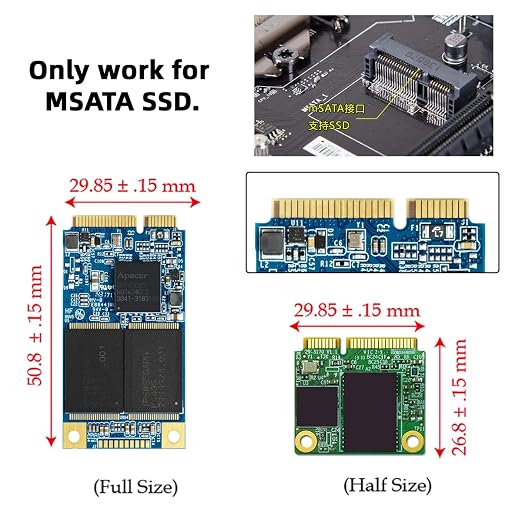
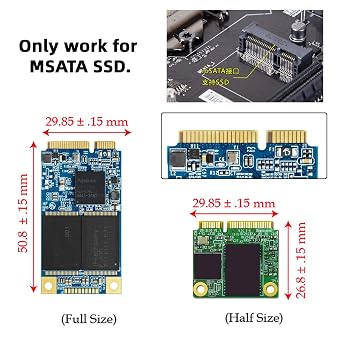
- 1. The adapter can work for 50*30mm size MSATA SSD.
- 2. Support WindowXP/2003/Vista/7, Linux , Mac systems
- 3. Standard input SATA-22P(15+7) to 50pin MSATA
- Note: 1. Not compatible with MINI PCI-E SATA SSD,eg. Brand ASUS EeePC SSD ; 2. Not compatible with M.2 NGFF SSD(B-key or M-key)
- Mini PCI-E mSATA SSD to 2.5" SATA Hard Disk Enclosure Case Converter Adapter for Intel Samsung Asus Black
| Hardware Interface | SATA 3.0 Gb/s |
| Hardware Platform | Universal |
| Compatible Devices | Personal Computer |
| Hard Disk Form Factor | 2.5 Inches (6.4 cm) |
| Supported Devices Quantity | 1 |
| Data Transfer Rate | 6 Gigabits Per Second |
| Connectivity Technology | SATA |
| Color | MSATA to SATA+Case |
| Enclosure Material | copper |
| Item Weight | 0.04 Pounds (20 grams) |
| Brand | cablecc |
| Global Trade Identification Number | 00646070678178 |
| Manufacturer | cablecc |
| UPC | 646070678178 646070728972 646070708172 |
| Mfr Part Number | SA-092-BK |
| Model Number | CY-SA-092-BK |
| Unit Count | 1 Count |
| Material | copper |
Who Should Buy?

-
Tech Enthusiasts
Ideal for users who enjoy upgrading and repurposing old mSATA SSDs for faster storage solutions.
-
DIY PC Builders
Great for builders needing to incorporate mSATA SSDs into standard 2.5" SATA configurations for various custom setups.
-
Portable Storage Users
Perfect for individuals wanting compact and lightweight storage solutions for on-the-go data management needs.

-
Casual Users
Not suitable for users with basic storage needs who require a plug-and-play solution without additional setup.
-
Mac Users
Mac systems may not support the mSATA to SATA conversion smoothly, limiting functionality and ease of use.
-
Non-technical Users
Users without technical knowledge may struggle with installation or setting up the adapter effectively.
Product Description
Have any Query? Chat with us
Customer Questions & Answers
-
Question:
What is the Cablecc mSATA SSD Mini PCI-E to 2.5 SATA adapter used for?
Answer: The Cablecc mSATA SSD Mini PCI-E to 2.5 SATA adapter is designed to convert an mSATA SSD into a standard 2.5-inch SATA drive. This is particularly useful for users looking to upgrade their existing laptops or desktops without replacing the entire device. By utilizing this adapter, you can maximize storage capabilities while ensuring compatibility with machines that only accept 2.5-inch drives. -
Question:
Is the Cablecc mSATA SSD converter compatible with all mSATA SSDs?
Answer: Yes, the Cablecc adapter is compatible with most mSATA SSDs available on the market. However, it's always advisable to check the specifications of your specific SSD model to ensure compatibility. This versatility makes it a valuable tool for users wanting to repurpose existing SSDs, seamlessly integrating them into a broader range of systems. -
Question:
How do I install the Cablecc mSATA to SATA adapter?
Answer: Installation of the Cablecc mSATA to SATA adapter is straightforward. Simply insert your mSATA SSD into the adapter, ensuring it clicks into place securely. Then, connect the adapter to your 2.5-inch SATA-compatible device. This plug-and-play setup allows for quick transitions from one storage type to another, enabling users to upgrade systems without advanced technical skills. -
Question:
Can I use this adapter to upgrade my laptop's storage?
Answer: Absolutely! You can use the Cablecc mSATA to SATA adapter to enhance your laptop's storage capacity. By converting your mSATA SSD into a 2.5-inch SATA drive, you can easily add additional storage without needing to replace the whole laptop. This is ideal for users seeking to improve performance by using faster SSD technology while maintaining compatibility with existing setups. -
Question:
What type of devices can I connect using this adapter?
Answer: The Cablecc mSATA SSD adapter can be connected to a variety of devices that support 2.5-inch SATA drives. This includes laptops, desktops, and gaming consoles compatible with standard SATA connections. This flexibility allows users to upgrade different types of systems with minimal effort, making it a smart choice for tech enthusiasts. -
Question:
Does the Cablecc adapter support SSDs with TRIM support?
Answer: Yes, the Cablecc mSATA to SATA adapter supports SSDs with TRIM functionality, which helps maintain optimal performance and longevity of the drive. When using this adapter, you can take advantage of the TRIM command if your operating system supports it, ensuring your SSD operates efficiently over time. -
Question:
What are the benefits of using an mSATA SSD over a traditional hard drive?
Answer: Using an mSATA SSD offers numerous advantages over traditional hard drives, including faster data access speeds, lower power consumption, and greater durability due to the lack of moving parts. This results in quicker boot times, faster file transfer rates, and improved overall system responsiveness, making it an attractive option for users looking to enhance the performance of their devices. -
Question:
Does the adapter provide any additional cooling for the SSD?
Answer: The Cablecc mSATA to SATA adapter does not have built-in cooling features, as it is primarily designed for connectivity. However, it's crafted from materials that allow for efficient heat dissipation during operation. If you're using a high-performance SSD, pairing the adapter with a suitable enclosure that offers cooling options would be beneficial for maintaining optimal performance during extensive use. -
Question:
What should I consider when choosing an mSATA SSD for this adapter?
Answer: When selecting an mSATA SSD for the Cablecc adapter, consider the SSD's read/write speeds, capacity, and whether it supports TRIM and other performance-enhancing features. Ensuring compatibility with your device's specifications is essential for optimal performance. Additionally, check for reviews or benchmarks on the SSD's performance in scenarios similar to your usage, such as gaming or data-heavy applications. -
Question:
Where can I buy the Cablecc mSATA SSD Mini PCI-E to 2.5 SATA adapter in Zambia?
Answer: You can purchase the Cablecc mSATA SSD Mini PCI-E to 2.5 SATA adapter from Ubuy, which offers a reliable online shopping experience for customers in Zambia. Ubuy provides access to a wide range of tech products, ensuring you can find the adapter conveniently and with great ease.
cablecc SATA Cables CY-SA-092-BK Editorial Review
Overall, the CY Mini PCI-E mSATA SSD to 2.5'' SATA Hard Disk Enclosure Case Converter Adapter has received mixed reviews from customers. Some customers have found success in using this adapter to replace old IDE drives with new SSDs in their laptops, resulting in increased speed and performance. However, there are also customers who have experienced issues with this adapter, such as compatibility problems with specific SSD models and poor build quality. Additionally, some customers have reported overheating and decreased battery life after installing this adapter. It is worth noting that there is an alternative IDE SSD adapter in the market that may be worth considering. Overall, the CY Mini PCI-E mSATA SSD to 2.5'' SATA Hard Disk Enclosure Case Converter Adapter has a mixed reception and may not be suitable for all users.
Customer Reviews & Ratings
482 customers ratings
-
5 Star
69%
-
4 Star
15%
-
3 Star
6%
-
2 Star
4%
-
1 Star
6%
Review this product
Share your thoughts with other customers
Pros
- Simple solution to replace old IDE drives with new SSD
- Increased speed and performance in some cases
- Easy to assemble
Cons
- Incompatibility with certain SSD models
Product Price History
Important information
- Limitations : For products shipped internationally, please note that any manufacturer warranty may not be valid; manufacturer service options may not be available; product manuals, instructions, and safety warnings may not be in destination country languages; the products (and accompanying materials) may not be designed in accordance with destination country standards, specifications, and labeling requirements; and the products may not conform to destination country voltage and other electrical standards (requiring use of an adapter or converter if appropriate). The recipient is responsible for assuring that the product can be lawfully imported to the destination country. When ordering from Ubuy or its affiliates, the recipient is the importer of record and must comply with all laws and regulations of the destination country.
- Not all the products listed on Ubuy are for sale, as Ubuy is a global search engine. Products are subject to export/trade regulations.
ZMW 430
Order now and get it around Friday, June 26
This item is not restrict in my country.(Please click on above link if this item is not restrict in your country, So our team will review and allow.)
QTY:
Only 2 items left in stock.
Secured transaction
Ubuy works hard to protect your security and privacy. Our advanced payment security system ensures confidentiality by encrypting your information during transmission using AES (Advanced Encryption Standards) and SSL (Secure Socket Layer) protocols. Your payment details are 100% secure as we do not share your payment details with third party sellers.
Our Top Logistics Partners
Fastest cross-border delivery
Features & Benefits
- Compatible with 50*30mm mSATA SSDs.
- Works with Windows XP/2003/Vista/7, Linux, and Mac.
- Utilizes standard SATA-22P (15+7) to 50pin mSATA.
- Ideal for upgrading and enhancing storage solutions.
- Not compatible with MINI PCI-E SATA SSD or M.2 NGFF SSDs.
- Easy installation for better performance and reliability.