- Home Page /
- Electronics /
- Television & Video /
- Television Accessories /
- Video Converters /
- YoloLiv YoloDeck, Studio Controller Keyboard,...
0 ratings






Item #:
88486801
YoloLiv YoloDeck, Studio Controller Keyboard, 15 Customizable LCD Keys, Trigger Actions on YoloBox Extreme/YoloBox Ultra/YoloBox Pro
Item #:
88486801
ZMW 4670
Price Details
Excluding Shipping & Custom charges ( Shipping and custom charges will be calculated on checkout )
*All items will import from US
0 ratings
Write a review
In stock
 Imported from USA store
QTY:
Only 14 items left in stock.
Order now and get it around Sunday, June 28
Secured transaction
Ubuy works hard to protect your security and privacy. Our advanced payment security system ensures confidentiality by encrypting your information during transmission using AES (Advanced Encryption Standards) and SSL (Secure Socket Layer) protocols. Your payment details are 100% secure as we do not share your payment details with third party sellers.
Our Top Logistics Partners


Experience one-touch operation and customizable controls to elevate your live streaming with YoloBox!

Fast
Shipping

Free
Return*

Secure Packaging

100% Original Products

PCI DSS Compliance

ISO 27001 Certified


Note: Step Down Voltage Transformer required for using electronics products of US store (110-120). Recommended power converters Buy Now.


What Stands Out
Customizable Keys
With 15 programmable LCD keys, users can personalize the YoloDeck for seamless workflow in live streaming, improving efficiency and control during broadcasts.
Studio Controller
As a dedicated studio controller, YoloDeck enhances the production quality by allowing precise trigger actions for YoloBox Ultra and Pro, catering to professional live streamers.
User-Friendly Design
Designed with an intuitive layout, the YoloDeck ensures that users can easily switch between functions, making it ideal for both novices and seasoned professionals in live streaming.
Product Details
- 15 Customizable LCD Keys: Instantly control your YoloBox
- One-Touch Operation: Features a responsive touchscreen that mirrors your YoloBox interface, allowing you to monitor and control your stream without touching the main unit
- Plug & Play with USB-C – Connect via USB-C and start using immediately without software installation or setup.
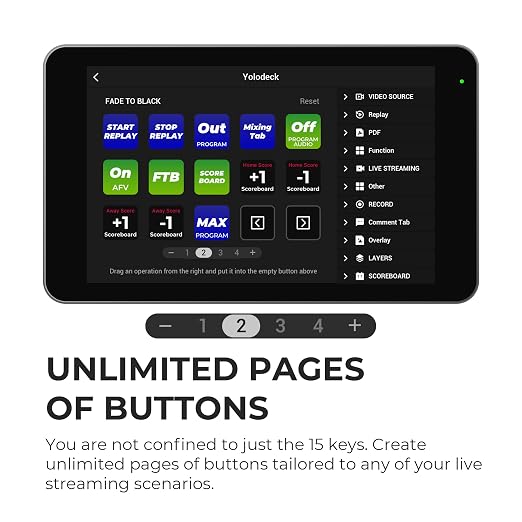
- Add Multiple Pages: You are not confined to just the 15 keys. Add unlimited pages of buttons tailored to any of your live-streaming scenarios
- Expand Your Live Production Setup – Combine YoloDeck with your existing YoloBox to create a more powerful, flexible streaming system. Enhance operational efficiency and reduce on-screen disruption
- Currently, the YoloDeck is compatible with the YoloBox Extreme/YoloBox Ultra/YoloBox Pro. Please update to the latest version to ensure compatibility
| Brand Name | YOLOLIV |
| UPC | 762715516381 762715516374 |
| Global Trade Identification Number | 00762715516374 |
| Manufacturer | YoloLiv |
| Part Number | YoloDeck |
| Model | YoloDeck |
| Included Components | Desk Stand |
| Unit Count | 1.0 Count |
| Display Type | LCD, Touchscreen |
| Smart Home Compatibility | Not Smart Home Compatible |
| Color | Black |
| Material Type | Aluminum |
| Item Weight | 0.15 Grams |
| Brand | YOLOLIV |
| Material | Aluminum |
What's in the box
Desk Stand
Who Should Buy?

-
Live Streamers
Ideal for content creators needing quick access to streaming controls and customizable shortcuts for seamless broadcasting.
-
Video Producers
Perfect for video editors and producers to streamline their workflows using programmable keys for frequent actions.
-
Event Organizers
Useful for professionals managing live events who require a reliable way to control live presentation tools dynamically.

-
Beginners
Not suitable for those new to streaming technology due to a potentially steep learning curve in setup and usage.
-
Casual Users
May not appeal to casual hobbyists who do not utilize advanced streaming functionalities or require extensive customization.
-
Limited Budget
Less ideal for those seeking affordable solutions, as YoloDeck falls into a more premium price range for video gear.
Product Description
Have any Query? Chat with us
Customer Questions & Answers
-
Question:
What is the YoloLiv YoloDeck and how does it work?
Answer: The YoloLiv YoloDeck is a versatile studio controller keyboard designed for live streaming and video production. Featuring 15 customizable LCD keys, it allows users to trigger various actions on the YoloBox Ultra and YoloBox Pro effortlessly. By mapping functions to each key, users can quickly switch scenes, control audio levels, and engage with their audience without navigating complex menus. Imagine hosting a live event where you need to switch between camera angles seamlessly; the YoloDeck makes that possible with just a press of a button. -
Question:
How do I customize the LCD keys on the YoloDeck?
Answer: Customizing the LCD keys on the YoloDeck is straightforward and enhances your workflow. Users can easily assign functions through the software interface, allowing each key to perform specific tasks relevant to their production needs. This could involve changing camera feeds, playing sound effects, or launching graphics. For instance, during a live show, you can assign a key to play an intro video, making your transitions smoother and more professional while keeping your viewers engaged with dynamic content. -
Question:
Is the YoloDeck compatible with other streaming software?
Answer: Yes, the YoloDeck is designed to work seamlessly with various streaming software applications and platforms. This compatibility means that whether you're using it in conjunction with OBS, vMix, or directly with YoloBox devices, you can expect a cohesive and efficient workflow. It's beneficial for creators who regularly use different platforms for their live events. Imagine being able to control your streaming setup at a glance, regardless of the software you're using, all thanks to YoloDeck’s versatility. -
Question:
What benefits does using YoloDeck provide for live-streaming professionals?
Answer: Using the YoloDeck provides numerous benefits, especially for live-streaming professionals. The customizable keys streamline operations, reduce potential errors during transitions, and enhance interaction with the audience. When hosting a live show, the ability to control multiple elements with one device means performers can focus more on engaging their viewers rather than managing technical details, resulting in a more polished and professional broadcast. -
Question:
Can I use the YoloDeck for recording videos as well as streaming?
Answer: Absolutely! The YoloDeck is not just limited to live-streaming; it is also a valuable tool for video recording professionals. Its customizable functionality allows users to manage their recording sessions efficiently, such as starting/stopping recordings, adding effects, or transitioning between scenes without complication. If you’re working on a pre-recorded segment that requires precise timing, the YoloDeck allows for smooth control that enhances the overall quality of the content you're producing. -
Question:
What kind of user experience does the YoloDeck offer?
Answer: The YoloDeck is designed with user experience in mind, offering intuitive controls and a customizable interface that caters to various skill levels. The tactile feedback of the keys allows for quick and accurate operation, making it ideal for fast-paced live environments. For someone new to streaming, this user-friendly design reduces the learning curve, enabling them to deliver impressive broadcasts sooner. It's like having a professional production assistant right at your fingertips, empowering you to create content more freely and efficiently. -
Question:
Does the YoloDeck require any special setup to use with YoloBox devices?
Answer: No special setup is required to use the YoloDeck with YoloBox devices, as they are designed to work together seamlessly. Simply connect the YoloDeck to your YoloBox Ultra or YoloBox Pro, and you can start customizing your key functions right away. This straightforward integration is especially beneficial for users who might be apprehensive about complex tech setups. It allows you to focus on content creation instead of technical difficulties, ensuring your live shows start off without a hitch. -
Question:
What types of content creators can benefit from the YoloDeck?
Answer: The YoloDeck serves a wide range of content creators, including gamers, educators, podcasters, and event producers. Gamers can switch between scenes and adjust their streams without taking their focus off the game. Educators can enhance online teaching by integrating media easily. Podcasters can control sound levels and triggers to improve the audio experience during live sessions. No matter the content type, the flexibility and customization options of the YoloDeck empower creators to elevate their broadcasts. -
Question:
How does the YoloDeck enhance audience engagement during live streams?
Answer: The YoloDeck enhances audience engagement by allowing creators to switch scenes, trigger effects, and interact with viewers promptly. With the press of a button, you can display audience polls, highlight comments, or play sound effects that resonate with your viewers, making the experience more interactive. This level of responsiveness keeps your audience engaged and invested in your content, leading to increased viewer retention and satisfaction. -
Question:
Where can I buy YoloLiv YoloDeck, Studio Controller Keyboard, 15 Customizable LCD Keys, Trigger Actions on YoloBox UltraYoloBox Pro in Zambia?
Answer: You can purchase the YoloLiv YoloDeck from Ubuy, which offers a convenient platform for securing this product in Zambia. Ubuy provides a wide selection of the latest tech products, ensuring you have access to the YoloDeck to boost your streaming and video production capabilities. By choosing Ubuy, you benefit from a reliable shopping experience along with customer support to assist you with your purchase.
YOLOLIV Video Converters Editorial Review


**Editorial Review of the YOLOLIV YoloDeck, Studio Controller Keyboard** The YOLOLIV YoloDeck has received positive feedback from customers, particularly among video professionals and enthusiasts. Many users appreciate the tactile interface the keyboard provides, which allows for quick and intuitive switching between cameras without the need to divert attention to a touchscreen. This aspect helps foster a more engaging and seamless live-streaming experience, especially during high-pressure situations where every second counts. The customization options provided by the 15 programmable LCD keys have been a highlight for many, enabling users to arrange their sources in a manner that aligns with their muscle memory. This personalization not only enhances efficiency but also makes the device adaptable for various setups, allowing the keys to be assigned according to specific workflows or preferences. Additionally, the YoloDeck has been noted to enhance the functionality of the existing YoloBox Ultra and YoloBox Pro devices. Users have reported that it turns these systems into more potent tools for both live streaming and video production, significantly simplifying operations even for individuals working alone. The integration of double re-entry effects is also appreciated, adding versatility to the video-switching experience. Overall, users find the YoloDeck to be an invaluable addition to their YoloBox setups, making the process of capturing and switching camera angles smoother and more enjoyable. **
Customer Reviews & Ratings
89 customers ratings
-
5 Star
82%
-
4 Star
9%
-
3 Star
3%
-
2 Star
2%
-
1 Star
4%
Review this product
Share your thoughts with other customers
Pros
- Intuitive tactile interface for quick camera switching
- 15 customizable LCD keys for personalized workflows
- Enhances functionality of YoloBox Ultra and Pro
- Ideal for solo operators and high-pressure streaming situations
- Quick setup and ease of use
Cons
- Limited feedback on integration with non-YoloBox systems
Product Price History
Important information
- Limitations : For products shipped internationally, please note that any manufacturer warranty may not be valid; manufacturer service options may not be available; product manuals, instructions, and safety warnings may not be in destination country languages; the products (and accompanying materials) may not be designed in accordance with destination country standards, specifications, and labeling requirements; and the products may not conform to destination country voltage and other electrical standards (requiring use of an adapter or converter if appropriate). The recipient is responsible for assuring that the product can be lawfully imported to the destination country. When ordering from Ubuy or its affiliates, the recipient is the importer of record and must comply with all laws and regulations of the destination country.
- Not all the products listed on Ubuy are for sale, as Ubuy is a global search engine. Products are subject to export/trade regulations.
ZMW 4670
Order now and get it around Sunday, June 28
This item is not restrict in my country.(Please click on above link if this item is not restrict in your country, So our team will review and allow.)
QTY:
Only 14 items left in stock.
Secured transaction
Ubuy works hard to protect your security and privacy. Our advanced payment security system ensures confidentiality by encrypting your information during transmission using AES (Advanced Encryption Standards) and SSL (Secure Socket Layer) protocols. Your payment details are 100% secure as we do not share your payment details with third party sellers.
Our Top Logistics Partners
Fastest cross-border delivery
Features & Benefits
- Choose from four models: YoloBox Ultra, YoloBox Pro, Instream, and YoloBox Mini.
- Features include bright displays up to 650 nits, perfect for clear visuals.
- Multiple HDMI inputs allow for versatile connectivity.
- Easily switch video sources and add overlays with one-touch operation.
- Customize 15 LCD keys and add unlimited pages for tailored streaming.
- Compatible with major platforms like Facebook, YouTube, and TikTok.