- Home Page /
- Tools & Home Improvement /
- Hardware /
- Door Hardware & Locks /
- Deadbolts /
- Philips WiFi Smart Lock with Fingerprint Keyp...
0 ratings


Item #:
87643052
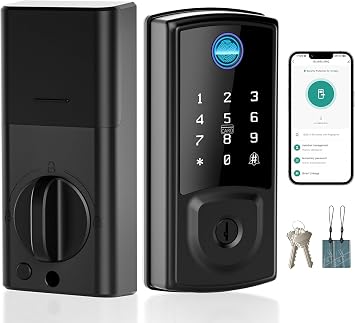
Philips WiFi Smart Lock with Fingerprint Keypad, Smart Deadbolt Smart Door Lock, Built-in WiFi, APP Remote Control, Keyless Entry Door Lock,
Item #:
87643052
ZMW 4395
Price Details
Excluding Shipping & Custom charges ( Shipping and custom charges will be calculated on checkout )
*All items will import from US
0 ratings
Write a review
In stock
 Imported from USA store
QTY:
Order now and get it around Friday, August 14
Secured transaction
Ubuy works hard to protect your security and privacy. Our advanced payment security system ensures confidentiality by encrypting your information during transmission using AES (Advanced Encryption Standards) and SSL (Secure Socket Layer) protocols. Your payment details are 100% secure as we do not share your payment details with third party sellers.
Our Top Logistics Partners


Turn your existing deadbolt into a smart lock with the Philips Wi-Fi Smart Lock—convenient, secure, and easy to install.

Fast
Shipping

Free
Return*

Secure Packaging

100% Original Products

PCI DSS Compliance

ISO 27001 Certified


Note: Step Down Voltage Transformer required for using electronics products of US store (110-120). Recommended power converters Buy Now.


What Stands Out
Smart Control
Allows remote management through an app, giving users convenient access control from anywhere, enhancing security and ease of use while eliminating the need for physical keys.
Fingerprint Access
Provides keyless entry utilizing advanced fingerprint recognition, ensuring quick and secure access for authorized users, which increases convenience and reduces the risk of unauthorized entry.
Auto-Lock Function
Automatically secures your door after a set time, preventing accidental leave-outs and enhancing security by ensuring the lock engages without user action.
Product Details
| Brand Name | PHILIPS |
| Recommended Uses For Product | Home / Apartment / Office / Rentals |
| Number of Pieces | 2 |
| Included Components | CR123A Batteries*2, Mounting Hardware, Philips 3000 Series Retrofit Lock, Philips Wireless Fingerprint keypad, User Manual |
| Model Number | DDL230X-1HWP |
| UPC | 850048306530 |
| Model Name | Philips 3000 Series |
| Manufacturer | PHILIPS |
| Manufacturer Part Number | DDL230X-1HWP |
| Item Type Name | WiFi smart lock |
| Additional Features | Auto-Lock, Built-in Wi-Fi, APP Remote Control, Fingerprint Keypad, PIN Code, Keyless Entry Door Lock, Upgrade Your Existing Deadbolt |
| Lock Type | Biometric, Deadbolt, Keypad, Smart Lock |
| Controller Type | Amazon Alexa, Google Assistant |
| Control Method | App, Remote, Touch, Voice |
| Connectivity Protocol | Bluetooth, Wi-Fi |
| Smart Home Compatibility | Smart Home Compatible |
| Style Name | Smart Lock+Fingerprint Keypad |
| Color | Matte Black |
| Shape | Round |
| Material Type | Zinc |
| Finish Types | Powder Coated |
| Item Dimensions | 2.9 x 3 x 2.2 inches (7.4 x 7.6 x 5.6 cm) |
| Item Weight | 16 ounces (453.6 grams) |
| Brand | PHILIPS |
| Special Feature | Auto-Lock, Built-in Wi-Fi, APP Remote Control, Fingerprint Keypad, PIN Code, Keyless Entry Door Lock, Upgrade Your Existing Deadbolt See more |
| Item dimensions L x W x H | 2.9 x 3 x 2.2 inches (7.4 x 7.6 x 5.6 cm) |
| Material | Zinc |
Who Should Buy?

-
Tech-Savvy Homeowners
Ideal for individuals who appreciate smart home technology and prefer convenient keyless entry solutions.
-
Frequent Travelers
Perfect for those who travel often, allowing remote access and monitoring of their home's security through an app.
-
Families with Kids
Great for families with children, providing a safe and easy locking mechanism without the need for physical keys.

-
Non-Tech Users
Users who are uncomfortable with technology may struggle to manage smart lock functions and app installations.
Product Description
Philips WiFi Smart Lock with Fingerprint Keypad, Smart Deadbolt Smart Door Lock, Built-in WiFi, APP Remote Control, Keyless Entry Door Lock, Auto-Locking, Status Logging, Black
Have any Query? Chat with us
Related Searches
Customer Questions & Answers
-
Question:
What features does the Philips Wi-Fi Smart Lock offer?
Answer: The Philips Wi-Fi Smart Lock boasts several advanced features, including remote control via a mobile app, keyless entry, and auto-lock capabilities. With built-in Wi-Fi, you no longer need an additional hub for connectivity. This means that you can manage access to your home directly from your smartphone, allowing you to lock or unlock your door from anywhere. Additionally, the smart lock can integrate seamlessly with existing deadbolts, upgrading your security without the need for expensive replacements. -
Question:
How does the remote control function work with the smart lock?
Answer: The remote control feature allows users to access their Philips Wi-Fi Smart Lock through a dedicated mobile app. By connecting to your home’s Wi-Fi, you can lock or unlock your door remotely, send digital keys to guests, and receive notifications regarding door activity. This feature is especially convenient for monitoring your home when you’re away, giving you peace of mind that your property is secure. Whether you're on vacation or at work, managing your door security is at your fingertips. -
Question:
Is installation complicated for the Philips Wi-Fi Smart Lock?
Answer: Installation of the Philips Wi-Fi Smart Lock is designed to be straightforward, enabling users to turn their existing deadbolt into a smart lock without the need for professional help. The lock comes with comprehensive instructions and the necessary hardware for a simple setup. Many users can complete the process in under an hour. This means you can transition to smart security quickly and without hassle, making it ideal for both tech-savvy individuals and those new to smart home devices. -
Question:
What security protocols does the Philips Wi-Fi Smart Lock use?
Answer: The Philips Wi-Fi Smart Lock employs robust security protocols to ensure that your home is protected. It uses encryption to secure your Wi-Fi connection, guarding against unauthorized access. Additionally, it includes features like auto-locking and customizable access codes. These measures not only enhance security but also provide a user-friendly experience, as you can grant and revoke access easily for friends and family, ensuring that only trusted individuals can enter your home. -
Question:
Does the Philips Wi-Fi Smart Lock require batteries?
Answer: Yes, the Philips Wi-Fi Smart Lock operates on standard batteries, ensuring reliability and ensuring it remains functional during power outages. The app intelligently manages battery life, sending alerts when it’s time to replace them. This means you’re always informed, and you can maintain the lock’s operation without unexpected interruptions. Regular monitoring of the battery ensures that your home security remains uninterrupted and reliable. -
Question:
What happens if the internet goes down?
Answer: In the event of an internet disconnection, the Philips Wi-Fi Smart Lock operates with the last known settings, continuing to provide access through preset access codes or previously authorized devices. This ensures that emergencies or power outages don’t compromise the functionality of your lock. Moreover, local storage of user data means you'll still have control over your lock, maintaining security without dependency on a constant internet connection. -
Question:
Can I access logs of who enters and exits through my smart lock?
Answer: Absolutely! The Philips Wi-Fi Smart Lock allows you to track entry and exit logs via its mobile app. This feature provides detailed information on when the lock was accessed and by whom, allowing for enhanced oversight of who is entering your home. This is particularly useful for families or busy households, as it helps ensure safety and accountability. You can easily monitor the comings and goings of residents or guests, providing an additional layer of security. -
Question:
How often should I change the access codes on the smart lock?
Answer: It's a good practice to change your access codes for the Philips Wi-Fi Smart Lock periodically, especially after guests have visited or whenever you feel it's necessary. Regularly updating codes enhances security by preventing unauthorized access. The mobile app allows for quick modifications, letting you maintain control over who has access. This practice ensures that previous codes cannot be exploited, promoting a secure environment for your home. -
Question:
Where can I buy the Philips Wi-Fi Smart Lock?
Answer: You can conveniently purchase the Philips Wi-Fi Smart Lock from Ubuy. Ubuy offers a user-friendly platform for exploring product specifications, comparisons, and more, ensuring you make an informed decision. Its website caters to consumers in Zambia looking for smart home solutions, providing a reliable avenue to enhance your home’s security with this advanced lock.
PHILIPS Deadbolts DDL230X-1HWP Editorial Review
The Philips 3000 Series WiFi Smart Retrofit Lock has received mixed reviews from customers. Some users were very happy with the device, mentioning that it connected easily to WiFi and the app worked well for remote locking and unlocking. However, some users experienced issues with the lock jamming, showing incorrect status, or not fitting their existing deadbolt. One customer found the installation process a bit challenging due to the age of their original deadbolt but was ultimately able to get it working. Another customer noted that the lock's functionality was not as advanced as other smart locks like Yale or August, particularly missing an Auto Unlock feature. Overall, the lock was praised for its ease of installation, flawless operation, keypad functionality, and smart features like storing fingerprints and auto-locking. However, some users were disappointed by the lack of door sensor notifications and compatibility issues with voice assistants like Alexa.
Customer Reviews & Ratings
1 customers ratings
-
5 Star
100%
-
4 Star
0%
-
3 Star
0%
-
2 Star
0%
-
1 Star
0%
Review this product
Share your thoughts with other customers
Pros
- Easy to install
- Works flawlessly
- Keypad and fingerprint functionality works well
- Stores fingerprint data
- Auto-lock feature is convenient
Cons
- Voice command compatibility concerns with certain assistants
Platform Trust & Buyer Confidence

MA
Mohammad
Verified buyer
“Excellent quality and original too,when ubuy send original things I will appreciate that ,I very satisfied thank you”
23 July 2026 · via Trustpilot
CK
Chitra
Verified buyer
“The order and delivery progress was communicated very well. Package arrived within the estimated time. Products arrived as expected in good condition.”
22-Jul-26 · via Trustpilot
K
kund
Verified buyer
“Good supply of products. Safe payment methods, and shipment worldwide! Genuine products.”
23-Jul-26 · via Trustpilot
OO
Onesi
Verified buyer
“Was my first time buying a product from Ubuy, but I found it so helpful. This is reliable. Gonna place a new order!”
22 July 2026 · via Trustpilot
SJ
SAO JOHN
Verified buyer
“Ubuy is a great online platform to buy stuff. Reliable, fast delivery time and great value for money. I've been using Ubuy online shopping platform for three years now and will continue to do so.”
23 July 2026 · via Trustpilot
Secure Checkout
Global Delivery
Easy Returns
Genuine Products
Top selling Smart Door Lock in Zambia




Last Updated on July 22, 2026
Product Price History
Important information
- Limitations : For products shipped internationally, please note that any manufacturer warranty may not be valid; manufacturer service options may not be available; product manuals, instructions, and safety warnings may not be in destination country languages; the products (and accompanying materials) may not be designed in accordance with destination country standards, specifications, and labeling requirements; and the products may not conform to destination country voltage and other electrical standards (requiring use of an adapter or converter if appropriate). The recipient is responsible for assuring that the product can be lawfully imported to the destination country. When ordering from Ubuy or its affiliates, the recipient is the importer of record and must comply with all laws and regulations of the destination country.
- Not all the products listed on Ubuy are for sale, as Ubuy is a global search engine. Products are subject to export/trade regulations.
ZMW 4395
Order now and get it around Friday, August 14
This item is not restrict in my country.(Please click on above link if this item is not restrict in your country, So our team will review and allow.)
QTY:
Secured transaction
PCI DSS compliant and ISO 27001:2022 certified, with encrypted payments and full buyer protection on every order.
Our Top Logistics Partners
Fastest cross-border delivery
Features & Benefits
- Transforms your traditional deadbolt into a smart lock without changing hardware.
- Built-in Wi-Fi allows remote access via the Philips Home Access APP.
- Receive real-time notifications and monitor locking events for enhanced security.
- Automatic locking feature ensures your door is always secured.
- Easily share access with family and friends through the APP.
- Quick installation in approximately 10 minutes on compatible deadbolts.
Ubuy Assurance
Experience worry-free shopping with 100% original products, PCI DSS-compliant payment security, ISO 27001-certified data protection, the fastest cross-border delivery, free returns *, and secure packaging on every order.