- Home Page /
- Books /
- Computers & Technology /
- Hardware & DIY /
- Peripherals /
- iPhone 16e User Guide: The Ultimate Tips & Tr...




Item #:
121771987
iPhone 16e User Guide: The Ultimate Tips & Tricks Manual with Simple Instructions and Pictures for Beginners & Advanced Users to Use and Operate the
83% of respondents would recommend this to a friend
Item #:
121771987
ZMW 424
Price Details
Excluding Shipping & Custom charges ( Shipping and custom charges will be calculated on checkout )
*All items will import from US
In stock
 Imported from USA store
QTY:
Order now and get it around Thursday, June 25
Secured transaction
Ubuy works hard to protect your security and privacy. Our advanced payment security system ensures confidentiality by encrypting your information during transmission using AES (Advanced Encryption Standards) and SSL (Secure Socket Layer) protocols. Your payment details are 100% secure as we do not share your payment details with third party sellers.
Our Top Logistics Partners


Don’t let your iPhone overwhelm you—take control today with the iPhone 16e User Guide.

Fast
Shipping

Free
Return*

Secure Packaging

100% Original Products

PCI DSS Compliance

ISO 27001 Certified


Note: Step Down Voltage Transformer required for using electronics products of US store (110-120). Recommended power converters Buy Now.


What Stands Out
Comprehensive Guide
This manual offers exhaustive tips and tricks tailored for both beginners and advanced users, making it easy for anyone to master their iPhone 16e effortlessly.
Visual Instructions
With clear pictures accompanying each instruction, users can quickly understand and apply concepts, enhancing their smartphone experience without confusion.
Up-to-Date Content
Released alongside the iPhone 16e, this guide ensures that all tips and functionalities are current, providing users with the most relevant and practical advice.
Product Details
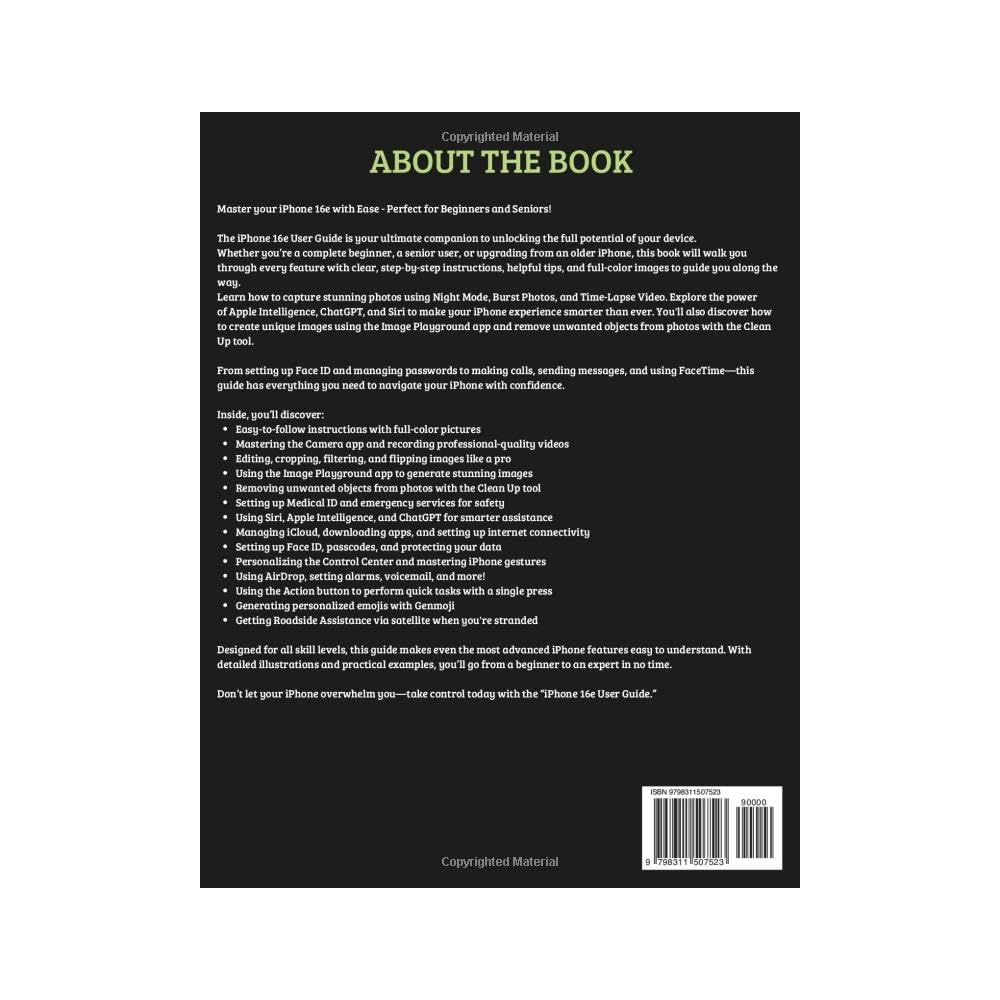
- Master your iPhone 16e with Ease - Perfect for Beginners and Seniors!The iPhone 16e User Guide is your ultimate companion to unlocking the full potential of your device. Whether you’re a complete beginner, a senior user, or upgrading from an older iPhone, this book will walk you through every feature with clear, step-by-step instructions, helpful tips, and full-color images to guide you along the way.Learn how to capture stunning photos using Night Mode, Burst Photos, and Time-Lapse Video. Explore the power of Apple Intelligence, ChatGPT, and Siri to make your iPhone experience smarter than ever. You'll also discover how to create unique images using the Image Playground app and remove unwanted objects from photos with the Clean Up tool.From setting up Face ID and managing passwords to making calls, sending messages, and using FaceTime—this guide has everything you need to navigate your iPhone with confidence.Inside, you’ll discover:Easy-to-follow instructions with full-color picturesMastering the Camera app and recording professional-quality videosEditing, cropping, filtering, and flipping images like a proUsing the Image Playground app to generate stunning imagesRemoving unwanted objects from photos with the Clean Up toolSetting up Medical ID and emergency services for safetyUsing Siri, Apple Intelligence, and ChatGPT for smarter assistanceManaging iCloud, downloading apps, and setting up internet connectivitySetting up Face ID, passcodes, and protecting your dataPersonalizing the Control Center and mastering iPhone gesturesUsing AirDrop, setting alarms, voicemail, and more!Using the Action button to perform quick tasks with a single pressGenerating personalized emojis with GenmojiGetting Roadside Assistance via satellite when you're strandedDesigned for all skill levels, this guide makes even the most advanced iPhone features easy to understand. With detailed illustrations and practical examples, you’ll go from a beginner to an expert in no time.Don’t let your iPhone overwhelm you—take control today with the iPhone 16e User Guide. Scroll down and click the “Buy Now” button at the top to get your copy.
| Publisher | Independently published |
| Publication date | February 20, 2025 |
| Language | English |
| Print length | 135 pages |
| ISBN-13 | 979-8311507523 |
| Item Weight | 14.7 ounces (416.75 grams) |
| Dimensions | 8.5 x 0.31 x 11 inches (21.6 x 0.8 x 27.9 cm) |
Who Should Buy?

-
New iPhone Users
Ideal for those transitioning to iPhone, offering easy-to-follow instructions to familiarize with features.
-
Tech Enthusiasts
Great for advanced users seeking to explore hidden features and maximize their smartphone's capabilities.
-
Visual Learners
Includes pictures and diagrams, perfect for users who benefit from visual aids in learning smartphone functions.

-
Experienced Users
Advanced users may find the basic instructions insufficient for their existing knowledge of the iPhone.
-
Professionals
Individuals needing in-depth understanding might require more technical manuals rather than a simple guide.
-
Non-English Speakers
Limited accessibility for users who may not understand English, as the guide is presented exclusively in English.
Product Description
Have any Query? Chat with us
Customer Questions & Answers
-
Question:
What is included in the iPhone 16e User Guide?
Answer: The iPhone 16e User Guide offers a comprehensive overview of the device, including step-by-step instructions, tips, and tricks for both beginners and advanced users. It is illustrated with pictures that help simplify complex processes. Each section is designed to address common issues, showcasing features like camera setups, settings customization, and troubleshooting tips, making it easy for users of all experience levels to navigate their new device. -
Question:
How can the iPhone 16e User Guide help beginners?
Answer: The guide is especially beneficial for beginners as it breaks down essential functions into easy-to-follow instructions. With clear pictures and straightforward language, users can quickly learn how to set up their device, use apps, and personalize settings. This is particularly useful for those who may feel overwhelmed by technology, providing them the confidence to fully engage with their iPhone. -
Question:
What advanced tips are included for experienced users?
Answer: For advanced users, the iPhone 16e User Guide delves into sophisticated features such as optimizing battery life, using shortcuts, and managing privacy settings. It also covers advanced photography techniques and Maximizing iOS functionalities that can enhance productivity. These tips can transform users' engagement with their device and ensure they are utilizing all available features effectively. -
Question:
What format is the iPhone 16e User Guide available in?
Answer: The iPhone 16e User Guide is typically available in both digital (PDF, ePub) and print formats. The digital version provides searchable content, making it easy to find specific information or troubleshoot problems quickly. The print version is handy for those who prefer having a physical manual at their fingertips as they navigate their device. -
Question:
Is the iPhone 16e User Guide suitable for all iPhone models?
Answer: While the iPhone 16e User Guide primarily focuses on the 16e model, many of the tips and instructions are applicable across various iPhone models. Users with slightly older models will still benefit from the general advice and tips provided. However, some features unique to the iPhone 16e may not apply to older devices. -
Question:
How often is the iPhone 16e User Guide updated?
Answer: The iPhone 16e User Guide is updated regularly to reflect the latest iOS updates and features. Keeping the guide current ensures that users have access to the most relevant information. This commitment not only assists users in navigating updates but also enhances their experience with new functionalities as they are introduced. -
Question:
Can I find troubleshooting tips in the iPhone 16e User Guide?
Answer: Yes, the iPhone 16e User Guide contains a dedicated section for troubleshooting common issues. It offers solutions to frequent problems like connectivity issues, app crashes, and battery drainage. These tips can be an invaluable resource for users experiencing difficulties, allowing them to promptly resolve issues and enhance device performance without needing technical assistance. -
Question:
Where can I buy the iPhone 16e User Guide?
Answer: You can purchase the iPhone 16e User Guide from Ubuy, which offers a convenient platform for ordering your copy online in Zambia. Ubuy provides both digital and print versions, ensuring you can choose the format that best suits your needs. Their reliable service ensures that your guide will be delivered to you promptly, making it easy to start mastering your iPhone. -
Question:
Does the iPhone 16e User Guide cover privacy settings?
Answer: Absolutely! The iPhone 16e User Guide includes crucial sections on managing privacy settings, teaching users how to safeguard their personal information. It discusses features such as app permissions, location services, and privacy protection tools. Understanding these settings is vital for users who wish to maintain strong privacy, especially given today's digital landscape, making the guide an essential resource. -
Question:
Are there illustrations in the iPhone 16e User Guide?
Answer: Yes, the iPhone 16e User Guide is richly illustrated with images accompanying the instructions. These visuals play a significant role in helping users understand complex processes. For example, users can see what settings look like on their screens or how certain features operate, which can be incredibly helpful for visual learners or those not as tech-savvy.
Peripherals Editorial Review
The "iPhone 16e User Guide: The Ultimate Tips & Tricks Manual" has garnered a mixed reception from users, primarily with regards to its clarity and comprehensiveness. Many customers, particularly those who identify as beginners or seniors, have praised the guide for its straightforward language and simple presentation of information. Users have reported finding it easy to understand, which greatly facilitates their learning process for navigating the iPhone 16e. Key topics like starting the device, using various features, and even basic finger movements are highlighted effectively, making it more accessible for those who may not be tech-savvy. However, while the user-friendly approach is commendable, some customers have expressed disappointment over the limited scope of information. They found the guide to be basic and lacking in depth, indicating a desire for more comprehensive tips and advanced instructions. As a result, while the guide serves its purpose of introducing users to the phone, those looking for more intricate functions may find it somewhat lacking. In summary, the "iPhone 16e User Guide" is ideal for beginners and seniors seeking straightforward, easily digestible information on their new device. However, it may not satisfy more advanced users looking for detailed guides and tips. **
Customer Reviews & Ratings
36 customers ratings
-
5 Star
42%
-
4 Star
17%
-
3 Star
21%
-
2 Star
13%
-
1 Star
7%
Review this product
Share your thoughts with other customers
Pros
- Written in easy-to-understand language.
- Simple presentation makes it accessible for beginners and seniors.
- Covers basic functions effectively.
Cons
- Limited in-depth information for advanced users.
Product Price History
Important information
- Limitations : For products shipped internationally, please note that any manufacturer warranty may not be valid; manufacturer service options may not be available; product manuals, instructions, and safety warnings may not be in destination country languages; the products (and accompanying materials) may not be designed in accordance with destination country standards, specifications, and labeling requirements; and the products may not conform to destination country voltage and other electrical standards (requiring use of an adapter or converter if appropriate). The recipient is responsible for assuring that the product can be lawfully imported to the destination country. When ordering from Ubuy or its affiliates, the recipient is the importer of record and must comply with all laws and regulations of the destination country.
- Not all the products listed on Ubuy are for sale, as Ubuy is a global search engine. Products are subject to export/trade regulations.
ZMW 424
Order now and get it around Thursday, June 25
This item is not restrict in my country.(Please click on above link if this item is not restrict in your country, So our team will review and allow.)
QTY:
Secured transaction
Ubuy works hard to protect your security and privacy. Our advanced payment security system ensures confidentiality by encrypting your information during transmission using AES (Advanced Encryption Standards) and SSL (Secure Socket Layer) protocols. Your payment details are 100% secure as we do not share your payment details with third party sellers.
Our Top Logistics Partners
Fastest cross-border delivery
Features & Benefits
- Ultimate manual for unlocking your iPhone 16e's full potential.
- Perfect for both beginners and seniors with step-by-step instructions.
- Includes tips on capturing stunning photos and using advanced features.
- Learn how to navigate with confidence using clear, illustrated guides.
- Master settings for Face ID, iCloud, Siri, and more for a personalized experience.
- Empower your smartphone skills and elevate your iPhone usage.